

Deprecated
Deprecation of Custom Reports API V1
about 1 hour ago by Public API Support
The Custom Reports API v1 will be deprecated in favor of the new Report API v2, with the final deprecation date set for Jun 30, 2027. As part of the transition to the new reporting experience, the Report API v2 provides access to all of the new report builder's data and functionality. All integrations using the Custom Reports API v1 must migrate to the Report API v2 to ensure continued service for our mutual customers. Please share this important update with your technical team.
What's new in the Report API v2:
- Faster performance: The new version is faster and more efficient at handling large datasets.
- Report selection: Administrators can explicitly choose which reports are made available via the API.
- Administrator visibility: Administrators get a new view of all reports available via the API, even for reports they don't own. They can still only open reports that are shared with them or that they own.
- Employee names: Historical custom reports now include first name and last name, so you no longer need to fetch these separately from the Employee API.
- Improved filtering: Better filter support (previously, only IS or IS NOT was possible).
Migration Guidance:
- Create API credentials with access to reports (see below). You will likely need support from your IT department or Integrations team.
- Ask an administrator to enable the reports you need for API access.
- Update integrations to use the Report API v2 endpoints.
1.Create access to the Report API
- In Personio, go to
Settings → API credentials. - Create or edit a Custom Integration and add reports access under Configure Access.
- After saving, use the client ID and API secret to obtain an access token. More details are available in the Authentication documentation.
curl --request POST \
  --url https://api.personio.de/v2/auth/token \
  --header 'accept: application/json' \
  --header 'content-type: application/x-www-form-urlencoded' \
  --data grant_type=client_credentials \
  --data client_id=papi-client-id \
  --data client_secret=papi-client-secret
2. Enable reports for API access
2.Enable reports for API access
Only reports enabled in the UI are available through the Report API v2. This step must be completed by an administrator.
- Custom reports remain available through the Custom Reports API v1 until the deprecation date. Access to these can't be disabled.
- Reports created with the new report builder are available via the Report API v2.
To enable a report:
- Go to Analytics > Reports.
- Check the box next to the relevant report.
- Click Manage API access.
- From the dropdown, select Enabled.
- Save your changes.
Notes regarding differences between the v2 and v1 endpoints:
- The Report API v2 supports GET only. It returns all rows and fields of a report as JSON. Creating or updating reports is not supported.
- As before, reports are queried one by one using the report ID.
- Requests require a bearer token obtained from the v2 auth endpoint.
- The List Report Attributes endpoint (GET /public-api/v2/reports/attributes) returns all reportable attributes, including data type, display name, and filtering/segmentation capabilities.
- The List Reports endpoint (GET /public-api/v2/reports) returns all reports available to the calling user, sorted chronologically, with ID, name, creation date, and summary configuration.
- The Get Report endpoint (GET /public-api/v2/reports/{id}) returns the full report, including its configuration (filters, attributes, segmentation, sorting) and its data rows.
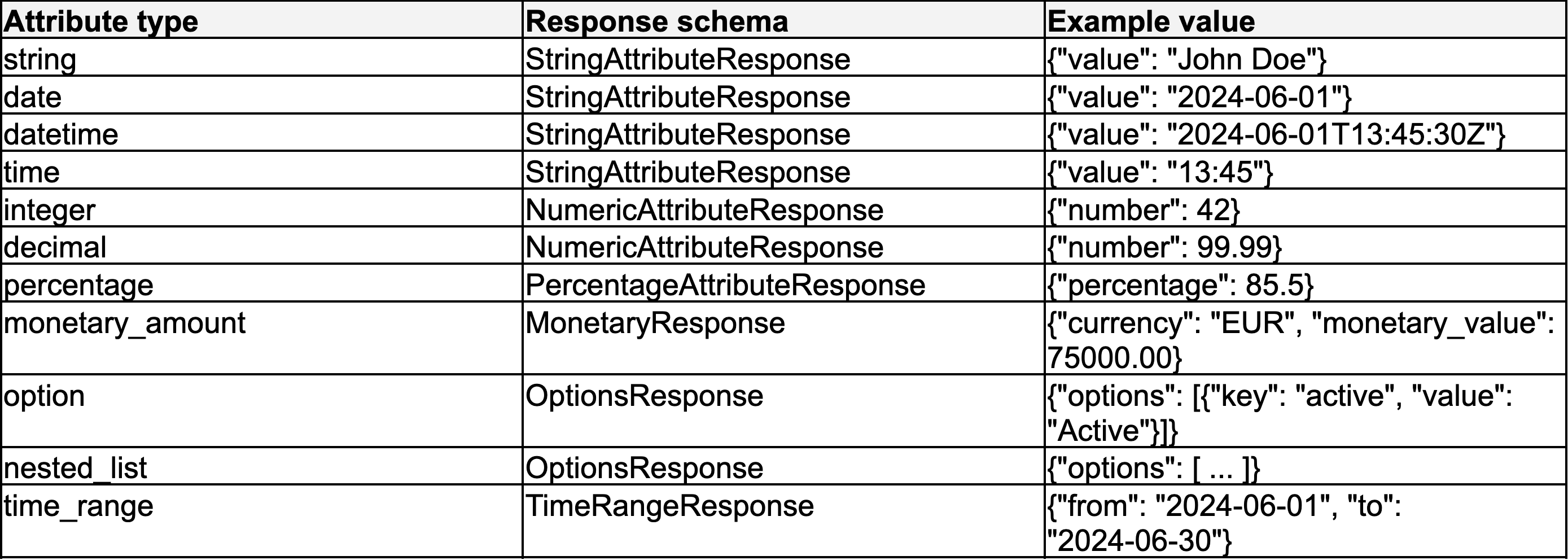
- Each attribute value is returned in a schema object determined by the attribute's data type. Only the field relevant to the value is populated:
Sample Request: Get Report by ID (v2)
curl --request GET --url '[https://api.personio.de/public-api/v2/reports/REPORT_ID](https://api.personio.de/public-api/v2/reports/REPORT_ID)'
--header 'accept: application/json'
--header 'authorization: Bearer papi-token'